
Korea mobile setup guide

How to Use eSIM in Korea

Compare data eSIMs, Korean number eSIMs, physical SIM cards, and roaming before you arrive in Korea.

Travelers using phone calls, mobile search and maps while connected in Seoul

Fast decision

Quick answer

  • Most short-term travelers may find that a data-only eSIM is enough.
  • Travelers who need delivery, local calls, or some reservations may need a Korean phone number.
  • A Korean phone number does not guarantee access to every Korean verification service.
  • Before buying, confirm that your phone supports eSIM and is not locked to your home carrier.

Choose by need

Decide what you actually need

Start with the service you need during the trip, then compare setup, support, and limitations.

DATA ONLY

International travel eSIM

For maps, messaging, translation, browsing and mobile data.

Best for
Short trips that mainly need maps, messaging, translation, and browsing.
What you get
Fast online purchase, no physical pickup, and installation before arrival.
Main limitation
No Korean phone number, calls, or SMS unless the plan clearly includes them.
Choose this when
Your compatible unlocked phone mainly needs mobile data.
KOREAN NUMBER

Korean-number eSIM

For a Korean phone number, domestic calls or SMS.

Best for
Travelers who need local calls, SMS, delivery contact, or some reservations.
What you get
Can include a Korean phone number and local mobile services.
Main limitation
May require passport verification and still may not support every identity check.
Choose this when
A local number matters more than a data-only setup.

Physical SIM

Best for
Longer stays, in-person setup, or phones without eSIM support.
Main advantage
Staff support may be available, and Korean-number plans may be easier to understand.
Main limitation
Requires pickup or delivery and may replace your home SIM if your phone has one slot.
Choose this when
You want setup help or cannot install an eSIM.

International roaming

Best for
Travelers who want the simplest setup from their home carrier.
Main advantage
No new SIM installation, and your original number stays active.
Main limitation
It is often more expensive, and plan limits depend on your home carrier.
Choose this when
Keeping the existing line with minimal setup is the priority.

Compatibility first

Check whether your phone will work

A compatible unlocked phone is the main requirement for using an eSIM in Korea. Complete these checks before comparing plans.

  1. Step 1
    Confirm eSIM support

    Check that your phone model can install an eSIM. On iPhone, the basic path is Settings → Cellular or Mobile Data → Add eSIM. On Android, it is usually Settings → Connections or Network → SIM manager → Add eSIM. Menu names vary by device and OS version.

  2. Step 2
    Confirm carrier-unlocked status

    Make sure your home carrier allows another mobile plan on the phone.

  3. Step 3
    Check the plan conditions

    Confirm that the included services and activation timing fit your arrival and travel needs.

  4. Step 4
    Save the installation details

    Keep the QR code, manual activation details, and provider instructions available before departure.

Compare before buying

Compare your Korea mobile options

Korea mobile options compared by traveler type, benefits, and limits.
Option Best for Main advantage Main limitation
Data-only eSIM Short trips, maps, messaging, translation, browsing Fast online purchase, no physical pickup, easy to install before arrival No Korean phone number, calls, or SMS unless the plan clearly includes them
Korean number eSIM Travelers who need local calls, SMS, delivery contact, or some reservations Can include a Korean phone number and local mobile services May require passport verification and still may not support every identity check
Physical SIM Longer stays, in-person setup, phones without eSIM support Staff support may be available and Korean number plans may be easier to understand Requires pickup or delivery and may replace your home SIM if your phone has one slot
International roaming Travelers who want the simplest setup from their home carrier No new SIM installation and your original number stays active Often more expensive and plan limits depend on your home carrier
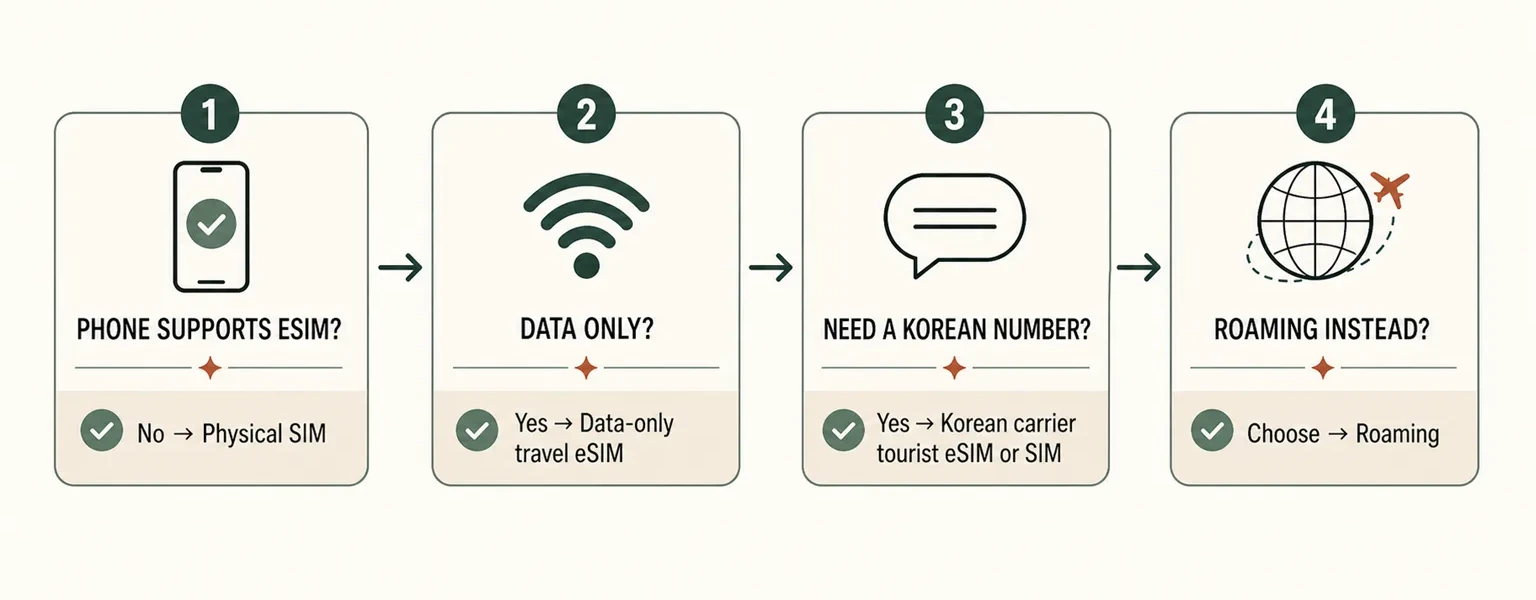
Korea eSIM quick decision guide comparing phone eSIM support, data-only use, Korean phone number needs, physical SIM, and roaming.
Use this quick decision path as a starting point, then confirm the plan's included services and activation rules before buying.

International eSIM

For most short trips, start with a data-only international eSIM that matches your phone, trip length, and expected data use. Korea Inside does not name a default provider here because included services and activation rules can differ by plan. Compare the best travel eSIMs for Korea to see how Ubigi, Saily, and Airalo differ in high-speed data, validity, hotspot use, activation, and refund or reissue conditions.

International eSIM plans

Usually best for data-first travelers who want online purchase and simple setup before arrival.

  • Check whether the plan is data-only.
  • Confirm hotspot, fair usage, speed limits, and refund rules.
  • Do not assume a Korean phone number is included.

Local mobile service

Need a Korean phone number?

A Korean-number eSIM or physical SIM may fit travelers who need local calls, SMS, delivery contact, hotel or driver calls, some reservations, or longer-stay support. This is different from a typical international data-only eSIM.

Korean eSIM and SIM plans

Use this option when local mobile services matter more than the fastest online setup. If you need a Korean number, domestic calls, or SMS, compare Korean carrier eSIMs with a phone number to see how SK Telecom, KT, and LG U+ differ in activation, calling, messaging, and identity-verification limits.

  • Check passport verification and activation timing.
  • Confirm calls, SMS, and Korean-number availability.
  • Compare airport pickup, store pickup, and online setup.

Some Korean telecom or tourist SIM/eSIM products may require passport verification, especially when the plan includes a Korean number, voice calls, or SMS. Before purchase, confirm the activation method, pickup method, passport requirement, and included services.

Setup sequence

Install and activate your eSIM

Use the provider's installation method and activation timing. Keep the setup information available until the connection is working.

  1. Step 1
    Keep the installation details ready

    Save the QR code, manual activation details, and provider instructions. Some eSIMs cannot be reinstalled with the same QR code after deletion.

  2. Step 2
    Follow the provider's setup method

    Install through the QR code, app, counter, or staff setup method provided with the plan. Complete passport verification if the selected product requires it.

  3. Step 3
    Activate at the correct time

    Follow the provider's instructions about when activation begins. After activation, select the eSIM as the mobile data line and turn on data roaming if the plan requires it.

After landing

Check your connection after landing

If the eSIM is installed but the connection does not work, check the line settings and activation status before deleting anything.

  • The eSIM is selected as the mobile data line.
  • Data roaming is turned on if the provider requires it.
  • The provider's activation period has started.
  • The internet connection works before you leave the airport or accommodation.
  • Your primary SIM remains active if you need messages from home.
  • Calls and SMS are included if you expect to use them.

Avoid common failures

Mistakes that cause the most trouble

Scanning an expired or used QR code

Why it causes trouble
The QR code may be expired, already used, or difficult to read.
What to do instead
Try the manual activation details or contact the provider before deleting anything.

Leaving the wrong data line selected

Why it causes trouble
The eSIM may be installed while mobile data still uses another line, data roaming is off, or activation has not started.
What to do instead
Check the eSIM line settings, roaming setting, activation timing, and provider instructions.

Expecting calls or SMS from a data-only plan

Why it causes trouble
A data-only plan does not include calls, SMS, or a Korean phone number unless stated.
What to do instead
Confirm every included service before purchase and complete number verification if required.

Buying while the phone is carrier-locked

Why it causes trouble
A locked phone may not accept another mobile plan.
What to do instead
Ask your home carrier about unlocking before you travel.

Deleting the eSIM too early

Why it causes trouble
Some eSIMs cannot be reinstalled with the same QR code.
What to do instead
Contact the provider and confirm whether reissue or reinstallation is possible before deleting it.

Important: Having a Korean phone number does not always mean you can complete identity verification on Korean apps.

Bottom line

Final recommendation

Most short-term visitors

Choose a data-only eSIM when a compatible unlocked phone mainly needs maps, messaging, translation, and browsing. It can be installed before arrival without physical pickup.

Travelers needing a Korean number

Choose a Korean-number eSIM or physical SIM, then confirm calls, SMS, passport requirements, and activation timing. Do not assume the number will support every Korean identity check.

Travelers with unsupported or locked phones

Consider a physical SIM if the phone does not support eSIM. If it is carrier-locked, ask the home carrier about unlocking before relying on another mobile plan.

Travelers who value maximum simplicity

International roaming keeps the original number active and avoids installing another SIM. Check the home carrier's price and plan limits because roaming is often more expensive.

FAQ

Frequently asked questions

Can I use eSIM immediately after landing in Korea?

Usually yes if your phone supports eSIM, the plan is installed, and the provider allows activation after arrival. Some plans require data roaming to be turned on for the eSIM line.

Do I need passport verification?

Some Korean SIM or eSIM products may require passport verification, especially when the plan includes a Korean phone number, voice calls, or SMS.

Can I get a Korean phone number with eSIM?

Some Korean eSIM plans include a Korean phone number. Many international eSIM plans are data-only, so confirm phone number, calls, and SMS before buying.

Does a Korean phone number work for all Korean app verification?

No. A Korean phone number alone does not guarantee access to every Korean identity verification service. App rules and telecom registration types can differ.

Is Google Maps enough in Korea?

Google Maps can help, but Korea often requires local map apps for better walking, transit, store, and address information. Prepare Naver Map or KakaoMap as alternatives.

Should I buy before arrival or at the airport?

Buying before arrival can save time if your phone is compatible. Airport pickup may be better if you want staff help, a physical SIM, or a Korean number plan.

Can I keep my WhatsApp or LINE number?

Yes. WhatsApp and LINE usually keep using your existing account number as long as the app remains installed and you have mobile data or Wi-Fi.

What happens if I delete my eSIM?

Some eSIMs cannot be reinstalled after deletion. Do not delete an eSIM unless the provider confirms it can be reissued or reinstalled.

Continue planning

Related Korea travel guides