Quick Comparison
Choose the app by the travel problem you need to solve, not by brand familiarity alone.
| Travel need | Best first choice | Backup or secondary use |
|---|---|---|
| Walking and local navigation | Naver Map | KakaoMap for an alternate route |
| Subway and bus routes | Naver Map | KakaoMap for a local cross-check |
| Finding the exact branch | Naver Map | KakaoMap to confirm the listing |
| Saved places and trip planning | Google Maps | Naver Map for the final local listing |
| English search failure | Naver Map with the Korean name or address | KakaoMap to cross-check the result |
| International reviews | Google Maps | Naver Map for local details and routing |
| Driving | Naver Map | KakaoMap; verify Google Maps on your device |
| Offline use | Check Google Maps download availability | Keep mobile data and saved Korean addresses |
Set Up Your Maps Before You Arrive
Prepare the apps, language and one test route while you still have reliable Wi-Fi.
-
Install Naver Map
Action Download the official app and open it once.
If it fails Search the store for “NAVER Maps, Navigation” and confirm the developer is NAVER Corp.
-
Install KakaoMap as a backup
Action Keep it ready for alternate routes and local cross-checks.
If it fails Continue with Naver Map and open the official KakaoMap web service when needed.
-
Keep Google Maps
Action Retain your saved places, shared lists and familiar trip plan.
If it fails Copy the place name or address into a local map app for the final route.
-
Allow location access
Action Allow location while using each app so the starting point is accurate.
If it fails Open the phone’s privacy or app permission settings and enable precise location.
-
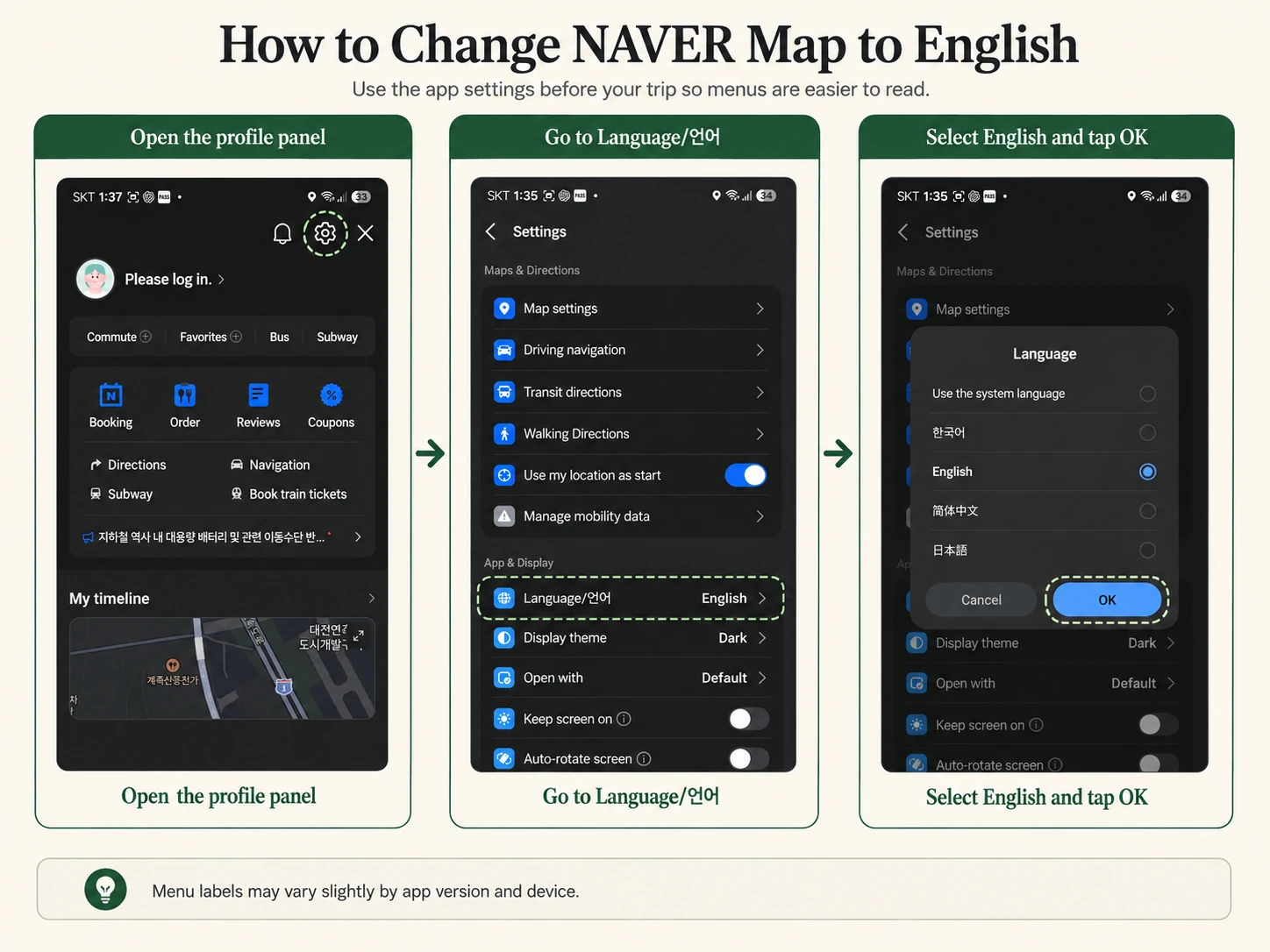
Change Naver Map to English
Action Open MY, Settings, Language, then choose English.
If it fails On iPhone, use Settings, NAVER Map, Preferred Language.
-
Save your hotel’s Korean name and address
Action Save the exact listing, Korean road address and phone number.
If it fails Copy the Korean text from your hotel or booking confirmation.
-
Test one airport-to-hotel route
Action Set the correct airport terminal and compare transit with the final walk.
If it fails Save a screenshot and verify the route again after landing.
Live routes work best with mobile data. Prepare an eSIM for Korea, compare eSIM options, review the essential apps guide, and add these steps to your Korea travel checklist.
How to Use Naver Map in English
Use this sequence from setup to the final subway exit or bus stop.
A. Change the app language to English
Android
MY Settings Language English
iPhone
MY Settings Language
If needed: iPhone Settings NAVER Map Preferred Language English
B. Search for a place
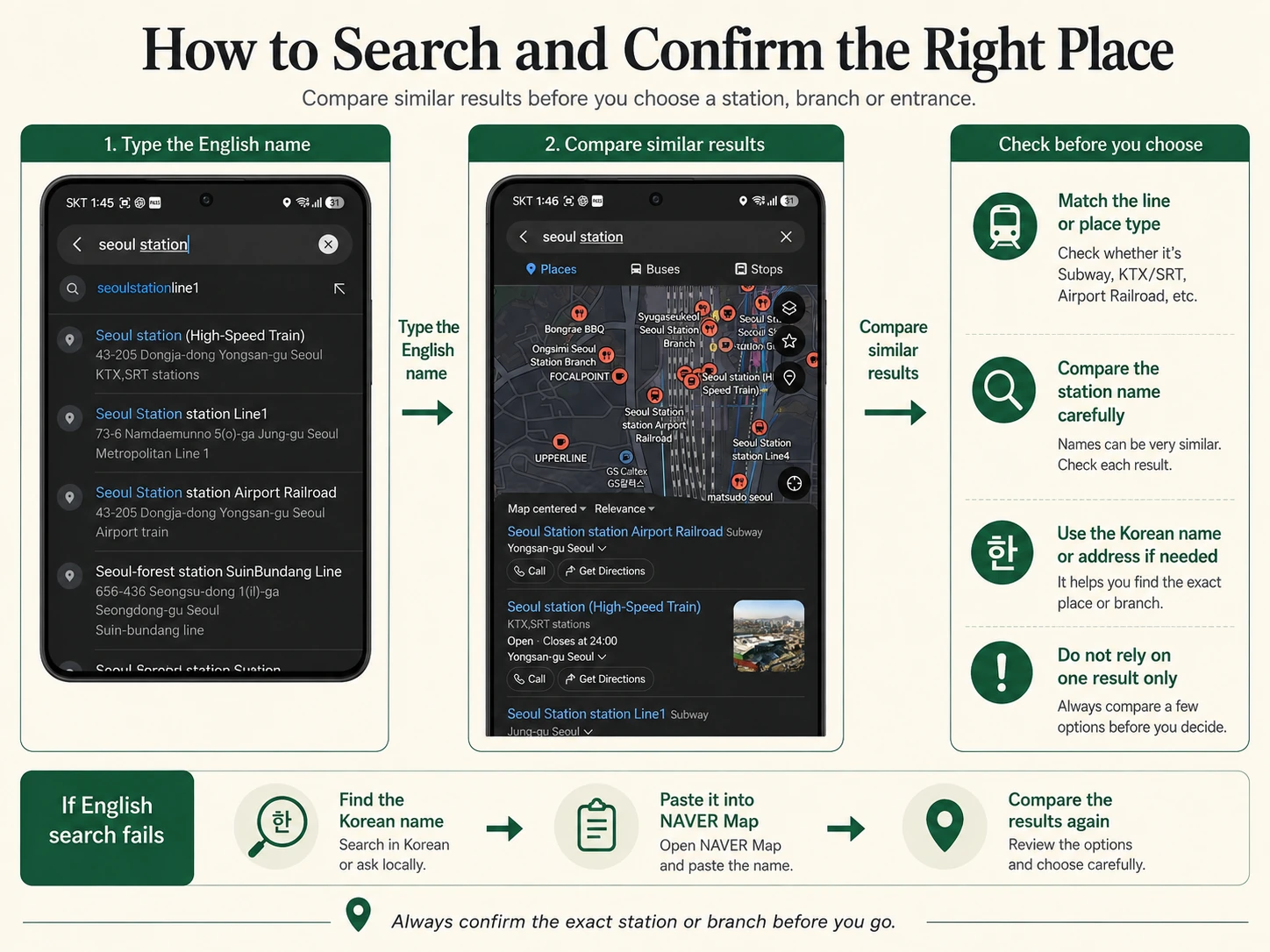
Try increasingly specific information. One failed English search does not mean the place is missing.
- English place name
- English road address
- Korean place name
- Korean road address
- Phone number
C. Confirm the correct branch
Hotels, cafés and restaurants can share a name across several neighborhoods. Check the listing before you start the route.
- Neighborhood or district
- Korean road address
- Phone number
- Photos
- Nearest subway station
- Distance from the station
- Opening information
D. Get directions
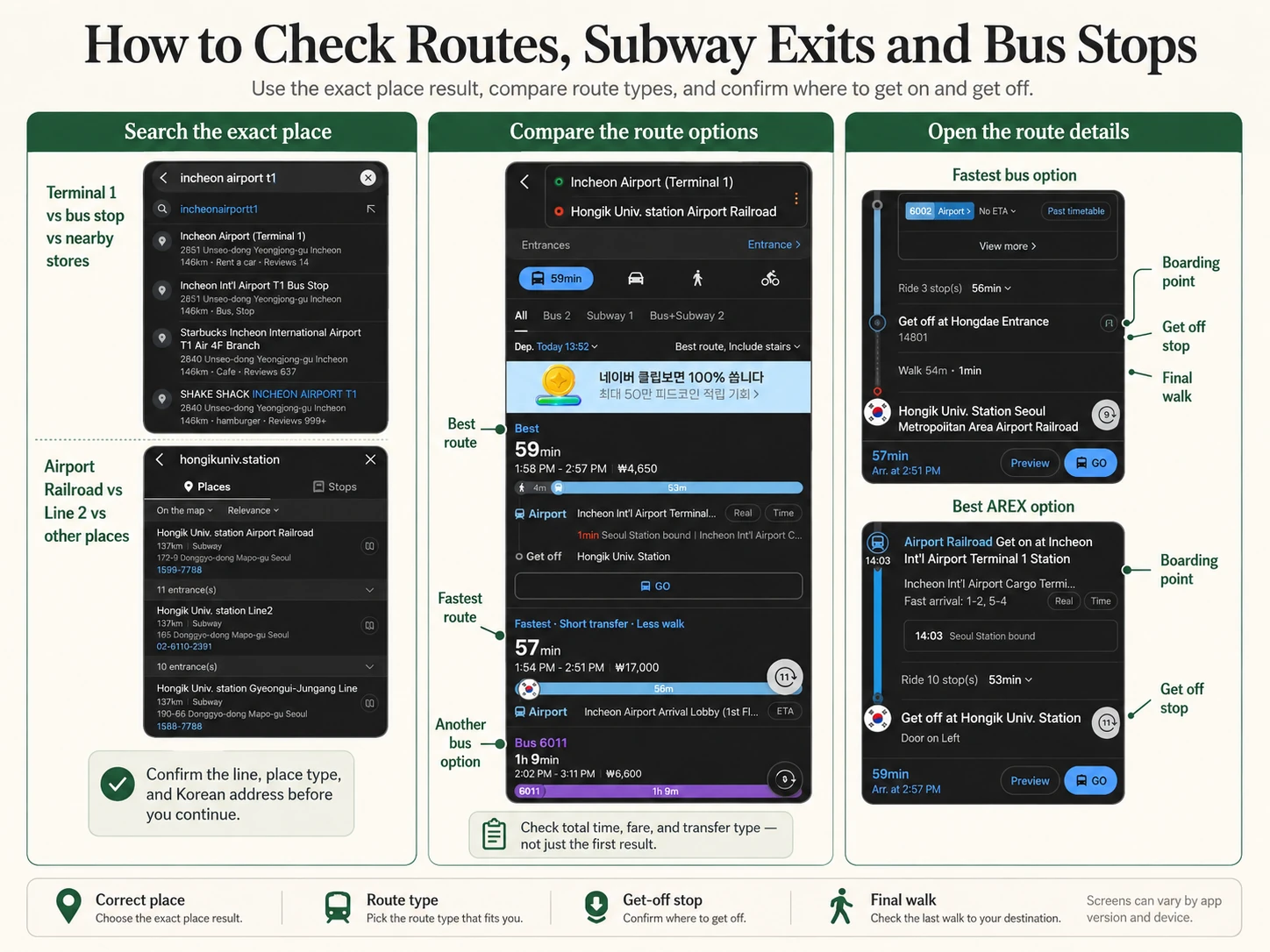
- Set your current location or another starting point.
- Select the confirmed destination.
- Choose transit or walking.
- Compare travel time, transfers and the final walking distance.
- Save the route before leaving Wi-Fi.
E. Check subway exits
- A station name alone is not enough.
- Confirm the exit number before leaving the train.
- Check which side of the road the exit reaches.
- Expect a long indoor walk at some large stations.
F. Check bus stops
- Two stops can have similar names.
- Confirm the stop number or direction.
- Check the bus destination before boarding.
- Review the final walking segment.
G. Save and share a place
- Save your hotel and exact airport terminal.
- Save restaurants only after confirming the branch.
- Copy the Korean address as text.
- Share the exact place link with travel companions.
What to Do When English Search Fails
Recover the result by switching from a translated name to the exact Korean listing information.
- English name fails
- Find the official Korean name
- Copy the Korean text
- Paste it into Naver Map
- Confirm address, phone and photos
- Cross-check in KakaoMap if needed
Where to find the Korean name
- Hotel or booking confirmation
- Official business website
- Official Instagram profile
- Google search result
- Korean road address
- Phone number
Why a result can still be wrong
- The booking-site name differs from the local registered name.
- Another branch uses the same name.
- The restaurant is registered under a building name.
- The business moved, closed or is a temporary pop-up.
- The shop is inside an underground mall.
- The English spelling varies.
When to Use KakaoMap as a Backup
KakaoMap adds a second local result when confirmation matters. It does not need to replace your main app.
- Naver search results are unclear.
- You want to compare an alternate walking route.
- You need to cross-check bus information.
- A local sends you a Kakao place link.
- You want to confirm a place name or address.
- You want another route before a late-night trip.
Naver Map first KakaoMap when confirmation or another route is needed.
What Google Maps Can and Cannot Do in Korea
Keep Google Maps, but separate today’s available features from possible future improvements.
South Korea approved Google’s export of 1:5,000 map data in February 2026 under strict security conditions. This may support future improvements, but rollout timing and feature availability can still vary by device, route and region.
Useful roles right now
- Save places before the trip.
- Organize shared lists.
- Read international reviews.
- Understand citywide location relationships.
- Share a familiar Google location.
- Check features currently available on your device.
Important Do not assume that every walking, driving or navigation feature is already fully available. Confirm the route on your device and keep Naver Map or KakaoMap ready.
Google offline maps
- Some countries or regions may not allow a map download.
- Offline transit, walking and cycling directions are unavailable.
- Mobile data remains important for live navigation and route changes.
Use the Right Map in Real Travel Situations
Start with the information that can change the route: terminal, branch, exit, stop direction or operating time.
-
Incheon Airport to your hotel
- Save the exact terminal and the hotel’s Korean address.
- Compare airport rail, bus and the final walk.
- Use the Airport Transfer Guide to compare the full journey.
- Check the Incheon Airport Guide and Arrival Guide if terminal or arrival steps affect the plan.
-
Hotel to a restaurant
- Search the Korean restaurant name.
- Confirm the branch, opening information and final walk.
- Use the Accommodation Guide when hotel location or station access is the real problem.
-
Finding the correct subway exit
- Check the exit before leaving the train.
- Review the street direction and whether you need an elevator.
-
Taking a local bus
- Confirm the stop direction, bus number and destination.
- Watch the final stop and walking segment.
-
Late-night return
- Confirm the last usable transit option.
- Cross-check a taxi pickup point and keep the Taxi Guide ready.
-
Sharing a meeting point
- Share the exact place listing and Korean address or name.
- Do not send only a neighborhood name.
Common Map Mistakes to Avoid
Small checks prevent the most common wrong-place and wrong-direction problems.
- Searching only in EnglishKeep the Korean name, road address and phone number ready.
- Choosing the wrong branchMatch the neighborhood, photos and nearest station.
- Ignoring the subway exitConfirm the exit before you leave the train.
- Using scheduled arrival instead of actual departureSet the route for the time you will really leave.
- Comparing only total travel timeCheck transfers, waiting and reliability too.
- Ignoring the final walk with luggageA short train trip can still end with a difficult walk.
- Selecting the wrong side of a bus stopVerify the direction or stop number before boarding.
- Relying on one app without a backupUse KakaoMap or another listing when a result is unclear.
- Leaving the airport without mobile dataActivate your eSIM, SIM or roaming plan before live navigation.
Download the Map Apps Before Your Trip
Use only the official store listing or service website.
Naver Map
Main navigation
KakaoMap
Backup local map
Google Maps
Planning and saved places
Frequently Asked Questions
Short answers to the map problems travelers most often need to solve.
What is the best map app for Korea?
Naver Map is the best first choice for most travelers because it combines local place search with walking, subway and bus routes. Keep KakaoMap as a backup and Google Maps for planning, saved places and international reviews.
Is Naver Map available in English?
Yes. In the app, open MY, then Settings, Language and English. On iPhone, the app may send you to Settings, NAVER Map and Preferred Language.
Does Google Maps work in Korea?
Yes. It is useful for saved places, shared lists, international reviews and broad trip planning. Route and navigation availability can still vary, so confirm the exact route on your device and keep a local map app ready.
Should I install KakaoMap too?
It is a useful backup, not a requirement for every traveler. Install it if you want to cross-check a place, compare a walking route, verify bus information or open a Kakao place link.
What should I do when English search fails?
Find the official Korean place name or road address in your booking, the business website or another reliable listing. Paste it into Naver Map, then confirm the address, phone number and photos.
How do I find the correct subway exit?
Open the route before leaving the train and confirm the exit number, the side of the road and the remaining walk. At a large station, also check whether you need an elevator and how far the indoor walk is.
How do I avoid choosing the wrong bus stop?
Check the stop number or direction, the bus destination and the side of the road before boarding. Similar stop names can refer to opposite travel directions.
Can I use offline maps in Korea?
Google says offline map downloads are unavailable in some countries or regions, and offline transit, walking and cycling directions are unavailable. Check download availability on your device and keep mobile data for live navigation.
How do I save and share my hotel address?
Save the exact hotel listing in Naver Map, copy its Korean name and road address, and share the place link with your travel companions. Also keep the text in your booking confirmation.
Do I need mobile data for map apps in Korea?
Mobile data is strongly recommended for route changes, live transit information, place details and sharing. Arrange an eSIM, SIM or roaming plan before you depend on live navigation.
Official Sources
Provider documentation supports the product instructions below. Korea Inside’s app order and backup advice are editorial recommendations.
- NAVER Map Help: app language settingsOfficial Android and iPhone paths for changing the app language.
- Google Maps Help: get directions and show routesOfficial guidance on route modes and feature availability.
- Google Maps Help: download areas and navigate offlineOfficial download limits and unavailable offline route modes.
- Republic of Korea policy briefing: Google 1:5,000 map export approvalGovernment decision and the security conditions that apply before data export.
- Kakao Corp: KakaoMap official feature documentationOfficial route, navigation and public-transport feature overview.
- Official app store pages Naver Map for iPhone Naver Map for Android KakaoMap for iPhone KakaoMap for Android Google Maps for iPhone Google Maps for Android